Social Media Manager Client Onboarding Checklist: 3 Phases
A social media manager client onboarding checklist: sort scope, access, and brand inputs, then test one post review before building your first batch.
By Notion SMM Portal by Cosmo Suite · Editorial policy
Published · Updated · 9 min read
The first week with a new social media client can fill up with small requests: the account list, brand files, a goal for each channel, and a decision about who approves a post. If those details stay in separate messages, you may be ready to draft while the client is still wondering what you need from them.
Social media client onboarding is the process of moving from an agreed scope to the access, working rules, and first reviewed content needed to start delivering. This checklist groups the work into three phases: before kickoff, the first week, and the first content batch. Each task has an owner and a way to tell when it is done. For a page-by-page view of where client plans, posts, and decisions can live, start with our social media client portal guide.
Key takeaways
- Confirm scope, goals, accounts, and approvers before the kickoff.
- Collect access, brand inputs, and review expectations in the first week.
- Test one representative post before preparing a larger batch.
What should be in a social media client onboarding checklist?
A useful checklist follows the order the work needs to happen. Confirm the job before the meeting, gather what you need to create the work, then test one post through the client review path. Without an owner, an item can sit in a shared list with nobody responsible for it.
| Phase | Main owner | Completion proof |
|---|---|---|
| Before kickoff | Manager, with client confirmation | Scope, goal, account list, and approver are recorded |
| First week | Manager and client | Needed access, brand materials, and review rules are checked |
| First content batch | Manager and approver | One post has moved through review, edits if needed, and a clear decision |
Completion proof means a result another person can check without relying on memory, such as a confirmed account list, an approved asset folder, or a post with its decision recorded. The client and manager can use that same evidence to mark a phase done.
UNIQUE INSIGHT: Treat the checklist as a handoff map. An item is ready only when its owner, visible completion proof, and next action are clear.
“We talked about it” is hard to use later when another person joins the work or a detail changes.
Onboarding also helps you choose a client workspace before the daily content starts. A social media client portal in Notion can keep onboarding details beside the content and approval pages, while a spreadsheet or shared folder may be enough for a smaller engagement. Choose a place the client will use, then keep the same item names and next steps wherever the work lives.
What should you confirm before kickoff?
Before the kickoff, confirm what the client hired you to do, what success means for this engagement, which accounts are in scope, and who can make a final content decision. The meeting is more useful when it answers open questions instead of collecting details that could have been written down beforehand.
Start with the agreed deliverables and the platforms they cover. Ask whether the work includes planning, writing, design, publishing, community replies, or reporting. Do not assume that a social media retainer includes every adjacent task. Put any unclear item in a “confirm” list for the meeting.
Then ask for the information that shapes content: the client’s main goal, intended audience, products or services to feature, seasonal dates, and examples of posts that feel right or wrong for the brand. Ask which claims, topics, or visuals need client confirmation before they go out. A short questionnaire can collect these details once, instead of reopening the same questions in separate threads.
Make a simple account list with the platform, handle, client owner, access status, and the person who can grant access. Keep passwords out of the list. If an account is owned or managed by someone outside the kickoff, identify that person now so the request has a clear path.
Finally, name the approver and the backup contact. If several people contribute feedback, ask who combines their notes and who makes the final decision. Write down where the client will review posts and how they will signal a change request. The existing five-stage client approval process explains how to keep a requested edit separate from approval.
What belongs in the first week?
Use the first week to gather the access, brand inputs, and working rules needed to make a draft. Keep the list specific to the platforms and deliverables in scope; a request for “all the logins” is both vague and easy to mishandle.
Ask the client to grant the role or partner access needed through each platform’s own settings. Have them retain ownership of their accounts. Record which account has been shared, who granted access, and whether you can open the workspace or see the page needed for the work. Do not put passwords in a shared Notion page, email, or chat. Sked Social’s onboarding process guide, published in July 2026, also treats account access as an explicit onboarding step rather than an informal handoff.
The exact controls depend on the network. TikTok Business Center’s member permission instructions and separate partner access guide describe two access flows. Use the platform’s current help page for the account in front of you, then record the access the client granted.
Collect approved logos, colors, photos, brand guidance, and links to source materials in one named place. Ask which assets are current and which are examples only. If the client sends a screenshot without the original file, note that the source asset is still needed before you prepare a design that depends on it.
Set the review routine while everyone is discussing the work. Agree where a draft appears, who reviews it, how feedback is attached to the post, and what counts as a clear approval. One social manager’s onboarding problem may be a scattered trail of screenshots and messages; another may receive “looks good” alongside a requested change. A quick agreement on the review location and decision words keeps both cases understandable.
Write the agreed route in a short client-facing note. It can be as plain as: “I will share each draft in the content board. Please leave comments on that post, then choose approve or request a change. I will send the revised version back for a new decision.” Use the client’s actual channels and preferences, and keep the final decision tied to the post record.
How do you prepare the first content batch?
Prepare one representative post first, then use what you learn to shape the rest of the batch. The first item should be typical enough to test the agreed format, asset handoff, feedback location, and approval route.
For that post, connect the planned platform and date to the exact caption and creative the client will review. Name the post so both people can find it without relying on its position in a changing list. Add the owner, client question, and next step in the same record.
A representative post is one typical draft chosen to rehearse the working process before you prepare the rest of a batch. Use the kind of caption, creative, and approval route the client expects to see. This checks the steps you agreed on; it does not predict the client's response time.
| Record item | What to include | Owner | Done when |
|---|---|---|---|
| Post identity | Short title, platform, planned date | Manager | Client and manager can find the same post |
| Draft | Caption and the image, video, or design link | Manager | The version for review is visible |
| Review prompt | The specific decision or question | Manager | Client knows what response is needed |
| Feedback | Note tied to this post and version | Client | Requested change is clear enough to make |
| Decision | Approve or request a change | Approver | The current version has an explicit next step |
This one-post test often reveals small setup gaps. The client may need a platform preview, a second approver, or a clearer distinction between a caption edit and a new concept. Record the answer in the checklist before you prepare the remaining posts. That makes the next handoff easier to repeat.
UNIQUE INSIGHT: One representative post rehearses the asset, feedback, and approval handoffs before the larger batch.
How do you test the approval path?
Send the representative post with one direct question and keep the status tied to the decision. “Can you review this caption and image?” gives the client a clear task. “Thoughts?” leaves open whether you want a preference, an edit, or permission to proceed.
Walk the post through the path you agreed on: draft, ready for review, feedback or requested changes, revised version if needed, and approval. Scheduling and publishing come after the decision, according to the service you provide. A portal can record those steps without connecting to or publishing on a social network.
Keep feedback and approval as separate records. If the client says “good, but change the opening line,” record the requested change and return the updated version. The new version needs its own decision. If the client approves it, note which version they approved and move it to the next step. Do not read a positive comment, a reaction emoji, or silence as approval.
Planable’s client onboarding guide describes a workflow that includes workspace setup, client collaboration, review, approval, and publishing. The exact product steps vary, so check whether your setup shows each person what action is waiting and who needs to take it. Planable’s onboarding resources for agencies list an agency checklist and materials for client collaboration and approval.
What if an onboarding item is still missing?
Keep an incomplete item visible with its owner and next request. Do not mark the whole onboarding phase complete because most details arrived; one missing account, asset, or approval contact can still block a particular post.
Use four fields for a blocked item: what is missing, who owns the next action, what you have already checked, and what you need the person to do next. For example: “Instagram access is pending. The client’s account owner needs to send the platform invitation. I have confirmed the handle and the person who controls it. Please send the invitation before we prepare a post that requires that account.” The note records the next action; platform permissions still need to be checked in the platform.
If an asset has not arrived, continue only with work that does not depend on it. If the approver is unknown, do not send a batch to a group and hope someone takes ownership. Ask the client to name the decision-maker and record the answer in the workflow. When the agreed review date passes, send a reminder that names the exact post and decision needed. Keep the status as waiting until you receive a clear answer.
When an item changes, update its status and tell the next person what changed. A client who sends a new logo after the first draft, for example, may have changed the asset that needs review. Keep the old version distinguishable from the current one so feedback does not attach to the wrong file.
How Notion SMM Portal fits the checklist
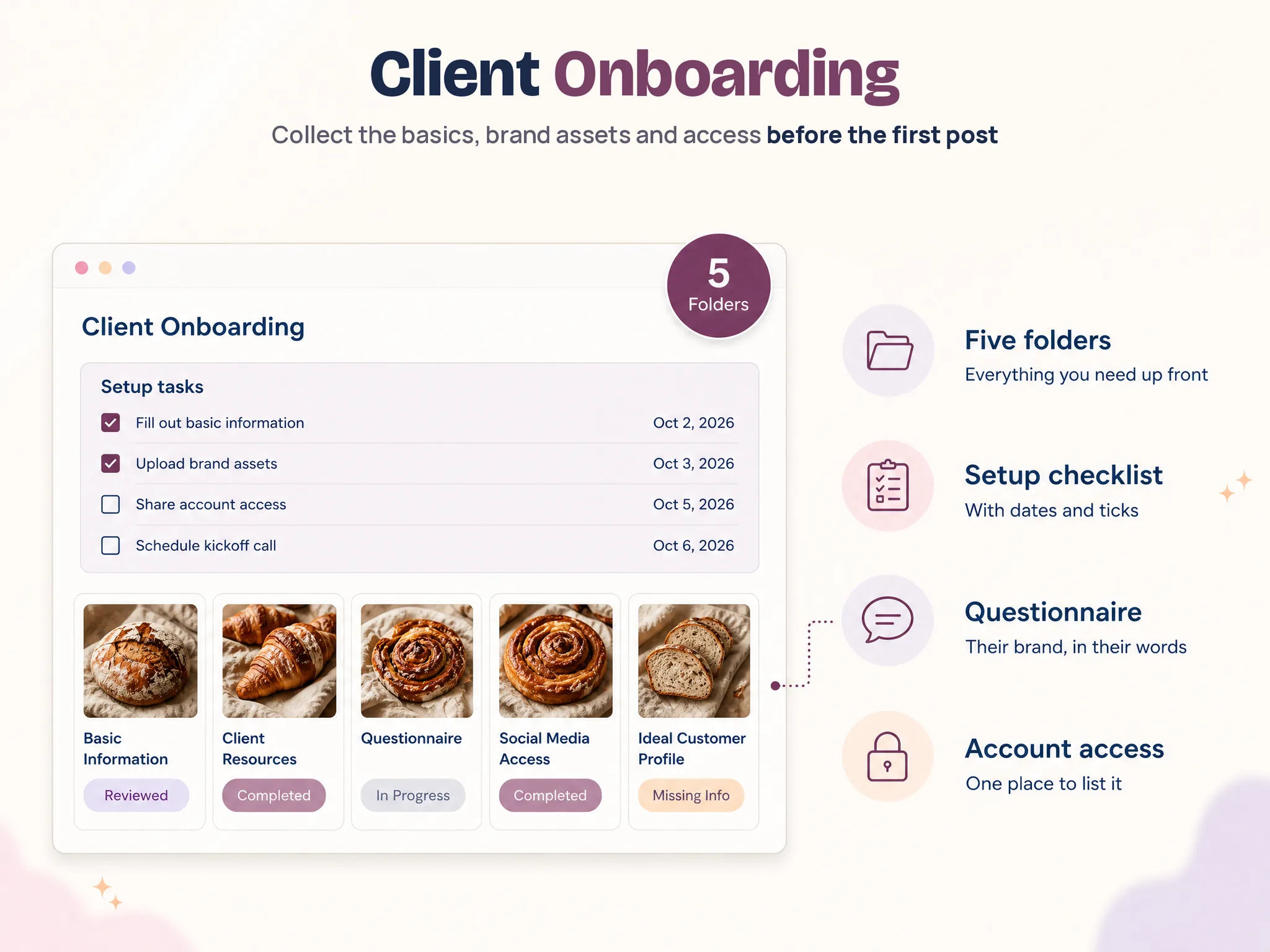
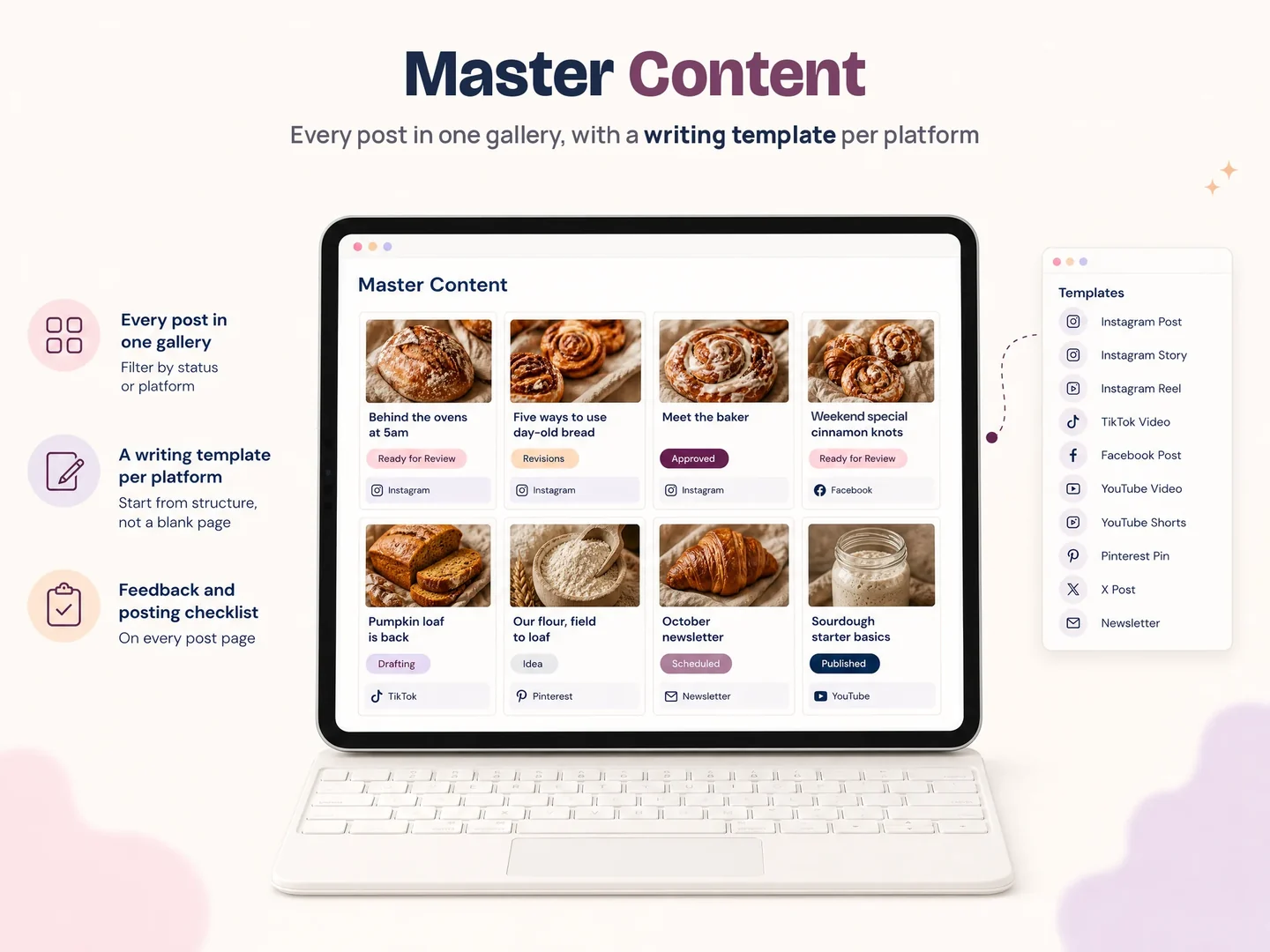
Notion SMM Portal includes a Client Onboarding page for basic information, brand assets, the questionnaire, social media access, the ideal customer profile, and a setup checklist. Its Content Production and Master Content pages hold the post workflow and post-level details listed in the product contents. The 13-page client portal also includes Strategy, Resources, Analytics, Meeting, Task, Payment, Contract, and Closing Chapter pages.
The onboarding page can hold the account list and setup status. The Master Content page gives each post a place for its caption, design link, feedback, and posting checklist. The Content Production page lists statuses from Idea through Published, plus client actions for Mark as approved and Need revision. Use these pages to organize the work, then define which accounts and content are in scope, who approves each version, and how the client shares access.
If you want those pages ready to duplicate for client work, Notion SMM Portal is the product page. Review the listed pages and choose the ones that match your process. It is a Notion template for organizing the client workflow, not a social network scheduler.
Why Trust This Article?
Notion SMM Portal by Cosmo Suite publishes this post. Product details come from the template’s approved contents list and its product screenshots. The checklist offers process guidance and does not promise a particular result. The cited Sked Social and Planable guides provide examples of published onboarding workflows. Read the editorial policy, visit About Cosmo Suite, or contact the team to report a factual error.
Frequently asked questions
What should a social media client onboarding checklist include?
List the agreed work and goal, who provides access, who approves content, the brand and account inputs, and what must be ready for the first batch. Give each item an owner and a clear sign that it is complete.
How do you onboard a new social media client?
Confirm the work and goal before kickoff. During the first week, collect access and brand inputs. Then prepare one representative post and test the review path before building the rest of the batch. Keep decisions beside the work.
What should a social media manager ask before starting?
Ask what the work should achieve, which accounts and formats are in scope, who supplies brand materials, who approves the posts, and where feedback should go. Check for upcoming launches or dates that could affect the plan.
How should a client share social media account access?
Ask the client to grant the access needed through each platform's own invitation or partner settings. They keep account ownership. Do not send passwords through chat or email. Confirm that you can open the accounts and assets needed for the work.
What should be ready before the first content batch?
Confirm the account list, brand assets, content direction, approver, review location, and route for requesting edits. Test the full process with one post before preparing the rest of the batch.
How do you keep client feedback separate from approval?
Record the client's note as feedback, then ask for a separate decision on that version: approve it or request a change. If they say 'looks good, shorten the opening,' make the edit and ask them to review the revised post.
